


Free shipping
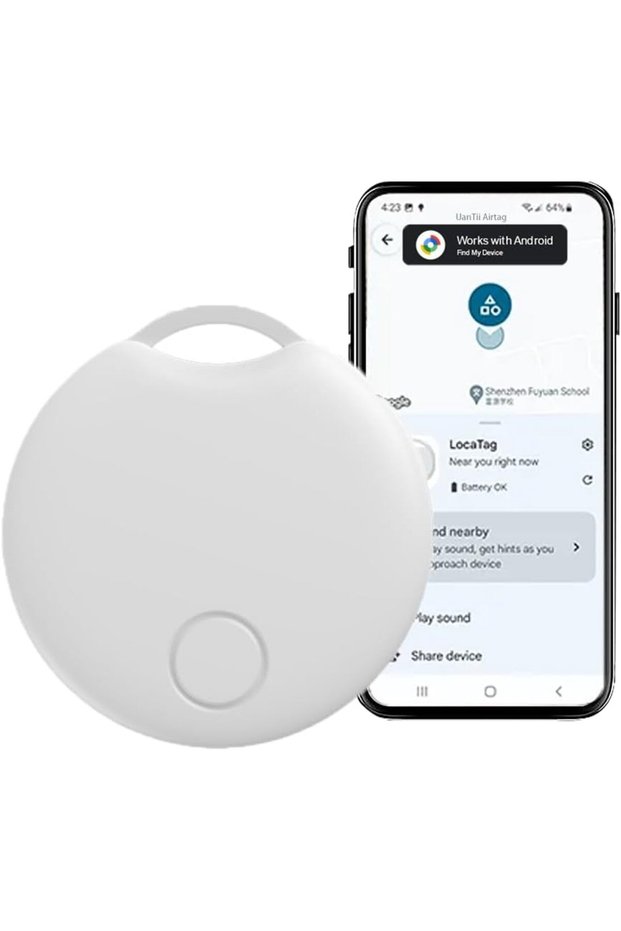


Generic Android Itag Bluetooth itag Smart Finder Works with Google Find Hub App for Android System (White-1p
No reviews yet.
-20%
145.49
SAR
181.86
(incl. VAT)
Free shipping
Delivery address

Select your address, find out the delivery date!
International delivery
Trendyol's commitments
Easy and free return in 15 days.
Payment methods



Highlighted features:
Generic Android Itag Bluetooth itag Smart Finder Works with Google Find Hub App for Android System (White-1p features
Color
Gold-colored
Available campaigns

Applied at checkout
gds
8.5
Seller information
Generic Android Itag Bluetooth itag Smart Finder Works with Google Find Hub App for Android System (White-1p reviews
No reviews yet.
Product details
Product description
Product description For Android System only, not for IOS system,not for iPhone
Specification: Itag-works with Google Find Hub Device Material:ABS Plastic Battery:Replaceable Battery-CR2032 (battery life over 1 year) Connectivity:BLE 5.4 Speaker:Built-in Buzzer >
75dB Getting Started:ON/OFF by one button Features: *Google Official Certified *Works with Google Find Hub Device app (Android 9 above) *Play sound to find item, more than 75dB *Lost Mode*Share Item with Other People *Personalized Name *Global Track In the Box:Smart Tag with CR2032 Battery*1User's Manual*1Nylon Cord*1,Pick*1 How to Use: Before connecting, ensure that your phone’s Bluetooth is turned on and the WiFi signal is at full strength.
2 Pull out the battery insulation tab to power on the device.
Your phone will automatically prompt the product connection page immediately.
3 Click "
Connect"
4 Read "
Use Responsibly"
and click "
Agree and Continue"
5 Once connected, click "
Open App"
to be redirected to the product management page.
How to solve reset the device: press the button 4 times and then press and hold the button until you hear the beeps, the device is in reset state How to use the function button How to power on: press the button once, the device is power on.
How to power off: press and hold the button for 5 seconds, the device is power off.
How to reset: press the button 4 times and then press and hold the button until you hear the beeps, the device is in reset state.
Tip: If you want a refund, please make sure to remove the items you have added before returning to avoid disclosing your privacy.
Before Use Please download the official Google Find Hub Device app through the Google Play Store: 1.Open the Google Play Store on your Android device.
2.Search for "
Find Hub Device"
3.Verify the developer is Google LLC.
4.Tap "
Install"
to complete the process.
Important Notes: 1.System Requirements: Requires Android 9 or later, and the device must be logged into a Google account.
2.Permission Settings: Ensure that "
Location Services"
and "
Device Administrator"
permissions are enabled.
3.Security Warning: Avoid downloading APK files from unknown sources to prevent malware risks.
Additional Tips: Keep Location Services and Bluetooth enabled for seamless tracking.
Replace the tracker’s battery when needed (if applicable).
Ensure your Google account is signed in on the app.
Note: Google’s Find Hub network is secure and anonymous—no personal data is shared with other users.
WARNING 1.Remove and immediately recycle or dispose of used batteries according to local regulations and keep away from children.
Do NOT dispose of batteries in household trash or incinerate.
2.Even used batteries may cause severe injury .
3.Call a local poison control center for treatment information.
4.Non-rechargeable batteries are not to be recharged.
5. Do not force discharge, recharge, disassemble, heat above 50°C/122F or incinerate Doing so may result in injury due to venting, leakage or explosion resulting in chemical burns.
6.The compatible battery type is CR2032 7.The nominal battery voltage :DC 3V 8. Ensure the batteries are installed correctly according to polarity(+ and -).
9. Do not mix old and new batteries, different brands or types of batteries, such as alkaline.
carbon-zinc, or rechargeable batteries.
10. Remove and immediately recycle or dispose of batteries from equipment not used for an extended period of time according to local regulations.
11. Always completely secure the battery compartment.
If the battery compartment does not close securely, stop using the product, remove the batteries, and keep them away from children.
Additional info
- A maximum of 5 units of this product can be ordered. Trendyol reserves the right to cancel orders over 5 units.
- Sold by .
- Barcode No: CofLt8gTPfBC7dFqO3RW4OBL1v8nAql7i3LiE
Generic Android Itag Bluetooth itag Smart Finder Works with Google Find Hub App for Android System (White-1p features
Color
Gold-colored
Safety information
Product safety information