Free shipping


Almost sold out!
Generic Aula F99 MAX Wireless Mechanical Keyboard, Smart Screen & Knob
No reviews yet.
-20%
1,091.22
SAR
1,364.03
(incl. VAT)
Free shipping
Delivery address

Select your address, find out the delivery date!
International delivery
Trendyol's commitments
Easy and free return in 15 days.
Payment methods



Highlighted features:
Generic Aula F99 MAX Wireless Mechanical Keyboard, Smart Screen & Knob features
Color
Pink
Connections
Wireless
Lighting
No
Touchpad
No
Numerical Buttons
No
Multimedia Keys
No
Available campaigns

Applied at checkout
Kadun
7.7
Seller information
Generic Aula F99 MAX Wireless Mechanical Keyboard, Smart Screen & Knob reviews
No reviews yet.
Product details
Product description
FN+Backspace: Turn On/Off Screen
FN+T: Adjust 12h/24h time format (or via F99 MAX driver).
Previous page Next page Previous page Next page • Volume Control &
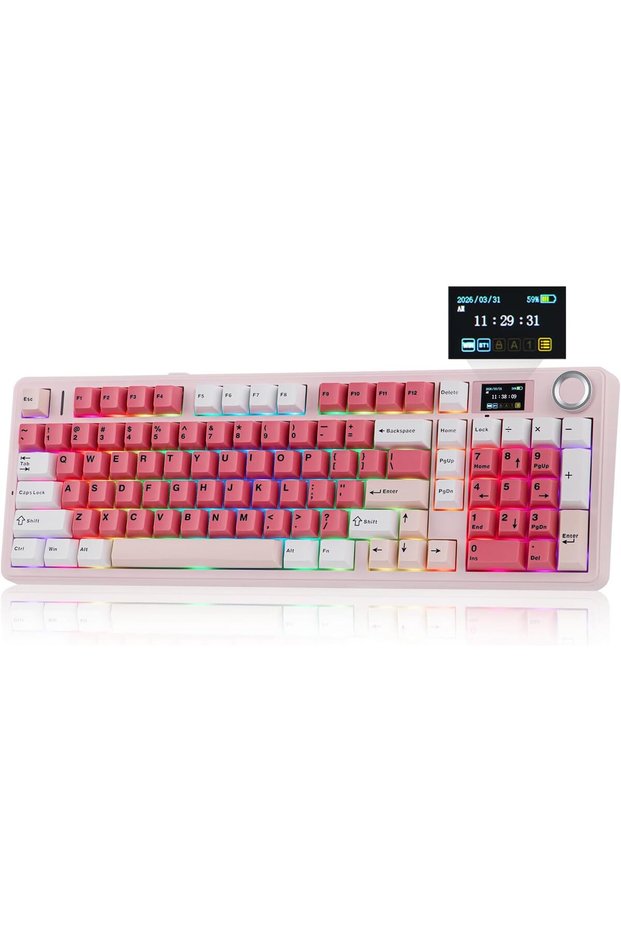
Screen Control Smooth Metal Knob Transform your desk into a personalized command center with the F99 MAX custom keyboard, featuring an integrated screen and multi-function knob.
The dual-function knob adjusts volume/mute, and lets you navigate the screen — customize backlighting, check battery, time &
status, or enjoy GIFs and animations.
FN+Knob to Swap Knob Function: Volume &
Screen ControlOur knob is intentionally smooth and ultra-responsive.
Some love the feel
others find it too sensitive.
For your comfort, we mention this • Swappable Switch, Changeable Keycaps Personalization Features Whether you prefer creamy linear, clacky clicky, or responsive tactile switches, the F99 MAX mechanical keyboard is effortlessly customizable with a simple pull-and-push design.
The double-shot keycaps feature rich, long-lasting colors that stay clean and clear even after months of use.
Made from thick PBT material, they feel great to the touch and offer excellent durability.
Designed with 5-pin sockets, the PCB plate supports both 3/5-pin mechanical switches.
• Durable PBT Keycaps in Cherry Profile Ergonomic Typing Angle Tired of finger fatigue or wrist strain? The F99 MAX keyboard features a comfortable typing height with Cherry profile keycaps in graduated heights, designed to follow the natural movement of your fingers and reduce muscle pressure.
The 2‐stage adjustable kickstand lets you choose the perfect typing angle, while the 5‐layer dampened gasket structure softens harsh bottom‐outs for a flexible, cushioned feel with every keystroke 3 typing angles at 5.02°, 7.37° and 9.7° with the 2-stage kickstand • 2.4Ghz Wireless/BT/USB Wired Triple Mode, Triple Convenience Immerse yourself in uninterrupted gaming sessions—no low-battery debuffs, no charging interruptions.
Plus, enjoy the versatile compatibility of the F99 MAX keyboard, which connects seamlessly to up to 5 devices simultaneously.
1st Time Pairing: 1).
Toggle mode switch to BT or 2.4G.
2).
Pressing FN+Q/W/E or FN+R until the flash quicken from slow to rapid.
3).
Connect on PC or plug dongle to PC.
Connect to Paired Devices: 1).
Toggle mode switch to BT or 2.4G.
2).
Tap FN+Q/W/E or FN+R once.
• US QWERTY ANSI Layout 1800 Layout with 97 Keys + Screen + Knob Weighing in at nearly 1.2kg, the F99 MAX keyboard is built durable and sturdy with a thick plastic shell, 97 keys featuring per-key RGB LEDs, a metal multi-function knob, and a glass screen.
The integrated 1800 layout boosts productivity with a dedicated numpad and eliminates the need for shifting, helping reduce hand and wrist fatigue.
• Why my Alt key and Win key swapped function? How can I switch the keyboard's input system? The keyboard may be in Mac mode.
Use "
FN + Knob"
to enter the display control interface and change the OS.
• What is upgraded on F99 MAX, from its predecessor F99? New smart display screen and metal knob and a new color scheme design • Why the Win key not functioning? The Win key maybe locked.
Please press Fn + Win to unlock it • How do I switch the time format between 12-hour and 24-hour mode on the F99 MAX keyboard? The time format setting (12h/24h) is adjustable in the F99 MAX driver, or you can use the FN+T shortcut to change the time format.
Additional info
- A maximum of 5 units of this product can be ordered. Trendyol reserves the right to cancel orders over 5 units.
- Sold by .
- Barcode No: CofLt8gTPfBC7cR9pP5ezfYPLHY3JYD9aGtm8
Generic Aula F99 MAX Wireless Mechanical Keyboard, Smart Screen & Knob features
Color
Pink
Connections
Wireless
Lighting
No
Touchpad
No
Numerical Buttons
No
Multimedia Keys
No
Safety information
Product safety information