


Free shipping
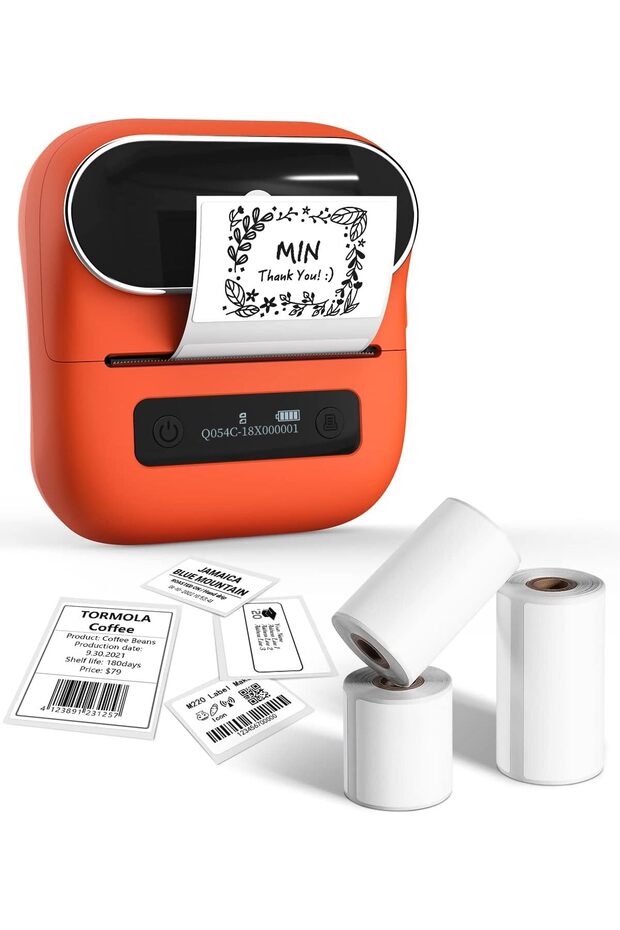


Generic M220 Label Maker, 3.14 Inch Bluetooth Thermal Label Printer for Barcode, , Labeling, Mailing,
No reviews yet.
333.55
SAR
(incl. VAT)
Free shipping
Delivery address

Select your address, find out the delivery date!
International delivery
Trendyol's commitments
Easy and free return in 15 days.
Payment methods



Highlighted features:
Generic M220 Label Maker, 3.14 Inch Bluetooth Thermal Label Printer for Barcode, , Labeling, Mailing, features
Color
Orange
aseelhome
Seller information
Generic M220 Label Maker, 3.14 Inch Bluetooth Thermal Label Printer for Barcode, , Labeling, Mailing, reviews
No reviews yet.
Product details

Product description
Thermal Label Maker - Never need the ink, toner, and ribbon again.
This barcode label printer prints using thermal technology, meaning you only need to restock on labels, the thermal label maker come with 3 Rolls Labels(1 Roll 40x30mm label, 1 Roll 60x40mm label, 1 Roll 70x80mm label)(Attention: The label maker only support print 0.78''- 3.14'' width labels, can't print 4 x 6 shipping labels) All-singing, All-dancing APP - Phomemo's R&
D team create the Print Master APP for you, with a variety of built-in functions.
One-click use: text, pictures, barcodes, QR codes, OCR, Form, hundreds of icons, and many pre-made templates for commercial and home use.
Improve your efficiency High Compatibility - Not only M220 label maker machine supports IOS, and Android mobile phone by bluetooth connection, but also supports USB connection for MAC and Windows 10. (WARNING: For your better experience, please be sure to watch the software installation tutorial on the page) Long Battery Life - M220 Label Printer Upgrade 2200 mAh battery provides up to 36 rolls of continuous printing, newly added auto-sleep mode, which can reduce power consumption by 25% and extend the use time by 2-3 hours.
Widespread Use - M220 3.14 Inch Bluetooth label printer has an extensive variety of uses and creative possibilities.
and Enjoy Labeling Anything Anywhere like Small businesses: clothing, crafts, retail, jewelry, eBay, etc.
Labeling , barcode, shipping, price, date, ingredients, logos labels for product.
Save you a lot of time for handwriting labels, allowing you to focus more on your small businesses Phone and Tablet Start Printing - Step 1: Download the App 'Print Master'.
Step 2: Turn on the M220 label maker and your phone's or tablet's Bluetooth.
Step 3: Click the 'Printer' icon in the App to search for the M220 portable label printer, connect it via Bluetooth in the App, select the label size, and edit the content to start printing Laptop/PC Starts Printing - Step 1: Please check your laptop/PC's operating system (OS) and download and install the correct M220 driver and the 'Labelife' app from the website.
Step 2: Use the USB data cable to connect the M220 label maker to your computer.
Step 3: Select the label size, edit the content, and choose M220 from the printer list
Additional info
- Sold by .
- A maximum of 5 units of this product can be ordered. Trendyol reserves the right to cancel orders over 5 units.
- Barcode No: CofLt8gTPfBC7dLKfPesv5gyy3F2PbNevVeg0
Generic M220 Label Maker, 3.14 Inch Bluetooth Thermal Label Printer for Barcode, , Labeling, Mailing, features
Color
Orange
Safety information
Product safety information