


Free shipping


Generic Scrolling Ring for TIKToks Remote Control ,Multifunctional Page Turner Scrolling and Camera Shutter Control For IOS and Androids
No reviews yet.
Only 2 left!
33
SAR
(incl. VAT)
Delivery address
Free shipping
Local delivery
Estimated delivery: 26 - 28 October
Select your address, find out the delivery date!
Trendyol's commitments
Easy and free return in 15 days.
Payment methods




Highlighted features:
Generic Scrolling Ring for TIKToks Remote Control ,Multifunctional Page Turner Scrolling and Camera Shutter Control For IOS and Androids features
Color
Black
Instructions for Use/Warnings
Linked via Bluetooth, when browsing Tik Tok, you can slide the video through the ring, operate the page up and down, volume up and down, play and pause, send like etc. To take a photo/video, long press the up and down keys of the controller. This wireless page turner can be used with most eBook apps such as Aldiko Book Reader, AIReader, Foxit PDF Reader etc. Note: it does not support kindle device. For iPhone, you have to turn on assistive touch (which leaves a circle on the screen at all times) to change videos on TikTok, and ensure the iOS software is above V14.8. If it still doesn't work, please restart the phone.
Similar items






 5 Meter HDMI Cable Box 4k 3d Full HD Male to Male TV PS3 PS4 PS5 Xbox Xiaomi Mibox 4k TV PC


 Trendyol Plus Exclusive







Shoppers also viewed


Generic Scrolling Ring for TIKToks Remote Control ,Multifunctional Page Turner Scrolling and Camera Shutter Control For IOS and Androids reviews
No reviews yet.
Product details
Product description
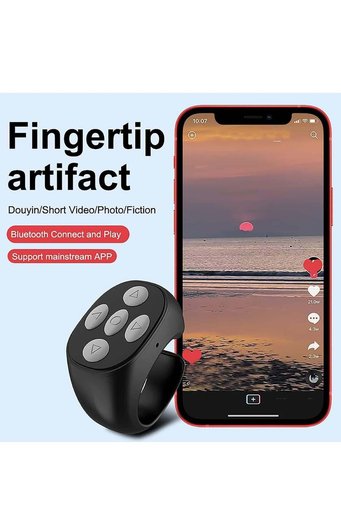
Linked via Bluetooth, when browsing Tik Tok, you can slide the video through the ring, operate the page up and down, volume up and down, play and pause, send like etc.
No need to swipe the video with your fingers, free your hands.
Efficient and stable Bluetooth chip, stable Bluetooth signal transmission within 30ft.
You only need to long press the up and down keys of the controller to take a photo/video.
You DON'T have to swipe your finger to slide/turn page when reading on eBook app.
This wireless page turner can be used to most eBook such as Aldiko Book Reader, AIReader, Foxit PDF Reader etc.
Note: it does not support kindle device.
Use time lasts for 14 hours from single charge and total 85 hours.
Providing convenient charging cable.
On iPhone you have to turn on assistive touch which leaves a circle on the screen at all times then you are able to change videos on tik tok app, also You need make sure the IOS software is above V14.8. If it still doesn't work, please restart the phone.
Additional info
- Sold by .
- A maximum of 5 units of this product can be ordered. Trendyol reserves the right to cancel orders over 5 units.
- Barcode No: PMPR9ZW4RIEIJ44878
Generic Scrolling Ring for TIKToks Remote Control ,Multifunctional Page Turner Scrolling and Camera Shutter Control For IOS and Androids features
Color
Black
Instructions for Use/Warnings
Linked via Bluetooth, when browsing Tik Tok, you can slide the video through the ring, operate the page up and down, volume up and down, play and pause, send like etc. To take a photo/video, long press the up and down keys of the controller. This wireless page turner can be used with most eBook apps such as Aldiko Book Reader, AIReader, Foxit PDF Reader etc. Note: it does not support kindle device. For iPhone, you have to turn on assistive touch (which leaves a circle on the screen at all times) to change videos on TikTok, and ensure the iOS software is above V14.8. If it still doesn't work, please restart the phone.
Safety information
Product safety information


