


Free shipping
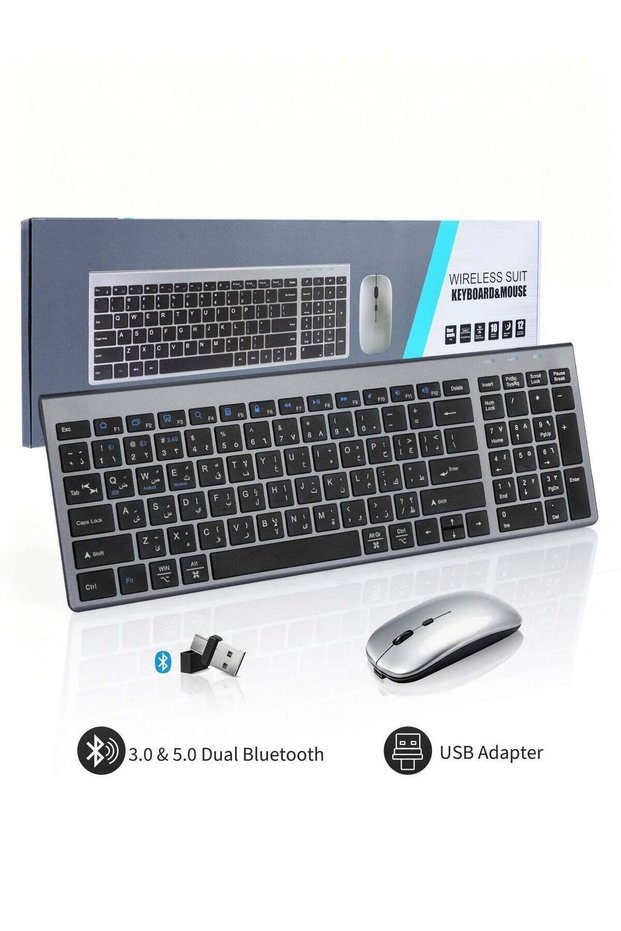


NECOMI Arabic/English Wireless Keyboard and Mouse Combo, Slim Wireless Bluetooth Keyboard & Mouse Co
No reviews yet.
221.81
SAR
(incl. VAT)
Free shipping
Delivery address

Select your address, find out the delivery date!
International delivery
Trendyol's commitments
Easy and free return in 15 days.
Payment methods



Highlighted features:
NECOMI Arabic/English Wireless Keyboard and Mouse Combo, Slim Wireless Bluetooth Keyboard & Mouse Co features
Color
Multicolor
qusenxiaodian
Seller information
NECOMI Arabic/English Wireless Keyboard and Mouse Combo, Slim Wireless Bluetooth Keyboard & Mouse Co reviews
No reviews yet.
Product details
Product description
Connection Description: Note: FN key is the second key in the bottom left corner of the keyboard Turn the power switch to ON to turn on the keyboard 2.4G Mode (system default) :Take out the USB receiver and plug it into the computer Bluetooth mode: Press and hold FN, then press 1, and then press and hold for 3 secondsthe blue light flashes,and Bluetooth device 1 enters the searched stateon the device side-open the system settings-turn on Bluetooth→search and add
Additional info
- Sold by .
- A maximum of 5 units of this product can be ordered. Trendyol reserves the right to cancel orders over 5 units.
- Barcode No: TR-A8945BF6FD04C333014BGA-01
NECOMI Arabic/English Wireless Keyboard and Mouse Combo, Slim Wireless Bluetooth Keyboard & Mouse Co features
Color
Multicolor
Safety information
Product safety information