


Free shipping
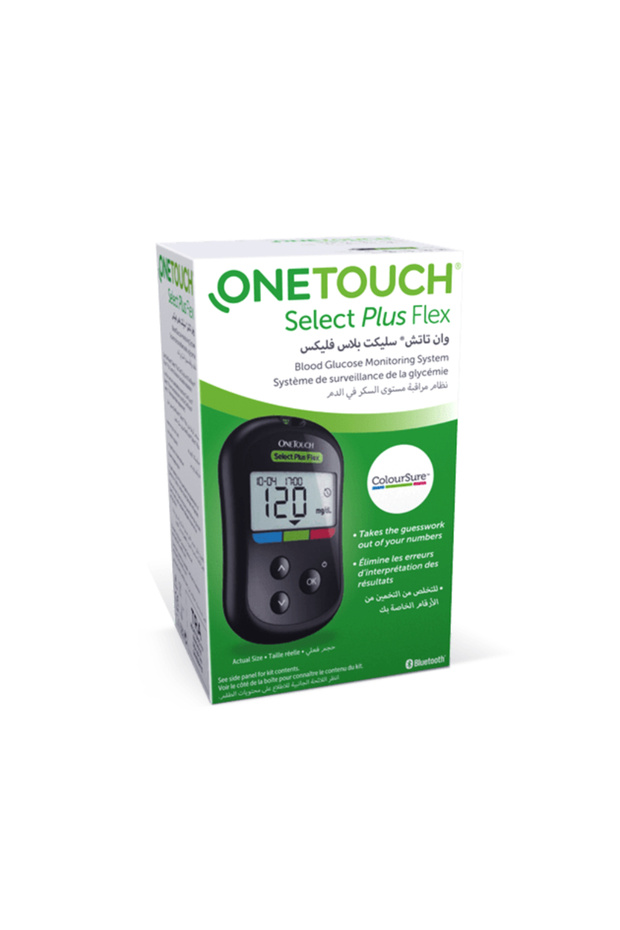


onetouch Onetouch Select Plus Flex Blood Glucose Meter- Glucometer with Smart Color Indicator Sela
Almost sold out!
 Trendyol Plus Exclusive
At checkout 186 SAR
200 SAR
Delivery address
Free shipping
Local delivery
Estimated to arrive in two days
Select your address, find out the delivery date!
Trendyol's commitments
Easy and free return in 15 days.
Payment methods



Highlighted features:
onetouch Onetouch Select Plus Flex Blood Glucose Meter- Glucometer with Smart Color Indicator Sela features
Other Features
تقنية ColorSure: مؤشر لوني يوضح فوراً إذا كانت النتيجة (منخفضة، مثالية، أو مرتفعة). شاشة واضحة: أرقام كبيرة وسهلة القراءة تناسب جميع الأعمار. دقة مثبتة إكلينيكياً: نتائج موثوقة تلبي معايير الدقة العالمية ISO. تصميم نحيف وعصري: جهاز صغير الحجم يسهل حمله في الجيب أو الحقيبة. اتصال بلوتوث: يتصل بتطبيق OneTouch Reveal لمتابعة النتائج عبر الهاتف.
Instructions for Use/Warnings
How to Use Insert the strip: Insert the OneTouch Select Plus strip into the device port; it will start automatically. Take the sample: Use the lancing device to obtain a small drop of blood. Touch: Touch the tip of the strip with the drop of blood until the confirmation window is filled. Understanding the result: The result will appear along with an arrow indicating the color (blue = low, green = ideal, red = high). Synchronization: Open the phone app to automatically transfer the results via Bluetooth.
Origin
DE
SILA
9
445 followers
Seller information
Similar items





 Aura New Generation Visco Coccyx Sitting Cushion Orthopedic Coccyx Visco Cushion 47X41X12 cm Vcm01






Shoppers also viewed





onetouch Onetouch Select Plus Flex Blood Glucose Meter- Glucometer with Smart Color Indicator Sela reviews
4 ratings
2 reviews

Product details
Product description
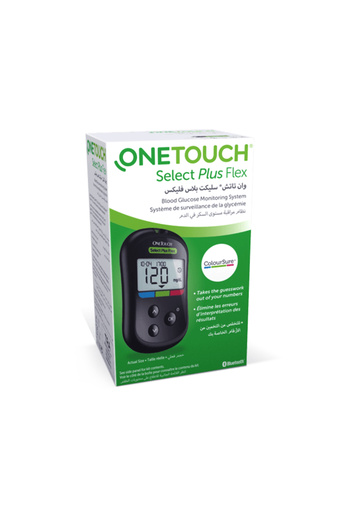
Do you find it difficult to understand the numbers of your blood glucose measurements and whether they are within the normal range or not?onetouch select plus flex is the perfect solution that ends your confusion once and for all.
thanks to the technology "
Range indicator "
Unique, you will not need to remember complex numbers
the colors will speak for you and tell you about your health in a matter of seconds.
why is this device the best investment for your health?colorsure technology ™ (smart color indicator): the instrument features a color band (blue-green-red) under the display.
once the result appears, the arrow will indicate one of the three colors immediately.
blue: it means low sugar.
green: means you are in the ideal range.
red: high sugar alert.
this advantage make the device best for old people and children.
accuracy exceeding international standards: leave no room for error with the "
And touch "
the device meets and even exceeds the latest international accuracy standards (iso 15197:2013), giving you reliable results you can fully rely on when consulting your doctor.
bluetooth connection (bluetooth ® ) and phone app: say goodbye to paper logbooks! The device automatically connects to the onetouch reveal app ® On your smartphone, where it graphs your results, making it easy to spot recurring patterns in your sugar levels and share them with your doctor at the touch of a button.
sleek and stylish design: the device is designed to be lightweight and ultra-thin, making it perfect for carrying effortlessly in a pocket or bag, making it your reliable companion for travel, work, or gym.
extreme user friendliness (no coding): the device requires no manual code input or coding
just insert the chip and start measuring immediately.
the large screen and clear numbers ensure comfortable reading even in low light conditions.
customize range: you are able to set the range limits (high and low) according to your own condition and doctor's recommendations, making the device "
Personally "
Completely yours.
Additional info
- Sold by .
- A maximum of 5 units of this product can be ordered. Trendyol reserves the right to cancel orders over 5 units.
- Barcode No: 4012427001430
- Origin: DE
onetouch Onetouch Select Plus Flex Blood Glucose Meter- Glucometer with Smart Color Indicator Sela features
Other Features
تقنية ColorSure: مؤشر لوني يوضح فوراً إذا كانت النتيجة (منخفضة، مثالية، أو مرتفعة). شاشة واضحة: أرقام كبيرة وسهلة القراءة تناسب جميع الأعمار. دقة مثبتة إكلينيكياً: نتائج موثوقة تلبي معايير الدقة العالمية ISO. تصميم نحيف وعصري: جهاز صغير الحجم يسهل حمله في الجيب أو الحقيبة. اتصال بلوتوث: يتصل بتطبيق OneTouch Reveal لمتابعة النتائج عبر الهاتف.
Instructions for Use/Warnings
How to Use Insert the strip: Insert the OneTouch Select Plus strip into the device port; it will start automatically. Take the sample: Use the lancing device to obtain a small drop of blood. Touch: Touch the tip of the strip with the drop of blood until the confirmation window is filled. Understanding the result: The result will appear along with an arrow indicating the color (blue = low, green = ideal, red = high). Synchronization: Open the phone app to automatically transfer the results via Bluetooth.
Origin
DE
Safety information
Product safety information