Free shipping


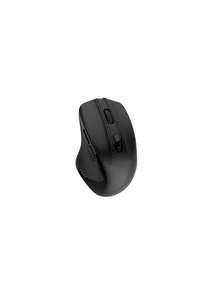
Seenda Wireless Mouse, Bluetooth Mouse for Laptop - Dual Mode (Bluetooth + 2.4G USB) Computer Mouse Compatible with MacBook, Windows Computers/Laptops - Black
No reviews yet.
Almost sold out!
79.98
SAR
(incl. VAT)
Free shipping
Delivery address

Select your address, find out the delivery date!
Local delivery
Trendyol's commitments
Easy and free return in 15 days.
Payment methods



Highlighted features:
Seenda Wireless Mouse, Bluetooth Mouse for Laptop - Dual Mode (Bluetooth + 2.4G USB) Computer Mouse Compatible with MacBook, Windows Computers/Laptops - Black features
Mouse Sensitivity (Dpi)
1000–5000 Dpi
Mouse Type
Optical
Connections
Bluetooth
Color
Black
Number of Buttons
4
KSADeals
8.5
Seller information
Seenda Wireless Mouse, Bluetooth Mouse for Laptop - Dual Mode (Bluetooth + 2.4G USB) Computer Mouse Compatible with MacBook, Windows Computers/Laptops - Black reviews
No reviews yet.
Product details

Product description
• Multi-Device Connectivity: This computer mouse is both a wireless mouse and a bluetooth mouse, which allows seamlessly to connects up to 2 devices (laptops, tablets, mobile phones, etc.
Easily switch between devices with the bottom button of the wireless mouse.
• Silent &
Portable Design: Silent clicks reduce noise by 95% (≤30dB), no disturbance in offices or libraries.
Compact and lightweight, this bluetooth mouse fits easily in any bag, perfect for home, office and travel use.
• 24-Month Battery Life: With just 1 AA battery (battery not included), this wireless mouse operates seamlessly.
A power switch at the bottom allows easy shutdown, ensuring sufficient battery for next use.
No frequent battery replacement hassle.
• 3 Adjustable DPI Values: This wireless bluetooth mouse has 3 levels of adjustable DPI(800-1200-1600)with optical sensors that work on almost all surfaces.
• Universal Compatibility: This portable mouse is compatible with USB-enabled devices running Windows XP, Windows 7/8/10 or higher, Mac OS X 10.10 or higher, as well as Bluetooth-enabled devices running Windows 8/10 or higher, Mac OS X 10.10 or higher, and Android 4.3 or higher Manufacturer: Seenda Color: Black • Multi-Device Connectivity: This computer mouse is both a wireless mouse and a bluetooth mouse, which allows seamlessly to connects up to 2 devices (laptops, tablets, mobile phones, etc.
Easily switch between devices with the bottom button of the wireless mouse.
• Silent &
Portable Design: Silent clicks reduce noise by 95% (≤30dB), no disturbance in offices or libraries.
Compact and lightweight, this bluetooth mouse fits easily in any bag, perfect for home, office and travel use.
• 24-Month Battery Life: With just 1 AA battery (battery not included), this wireless mouse operates seamlessly.
A power switch at the bottom allows easy shutdown, ensuring sufficient battery for next use.
No frequent battery replacement hassle.
• 3 Adjustable DPI Values: This wireless bluetooth mouse has 3 levels of adjustable DPI(800-1200-1600)with optical sensors that work on almost all surfaces.
• Universal Compatibility: This portable mouse is compatible with USB-enabled devices running Windows XP, Windows 7/8/10 or higher, Mac OS X 10.10 or higher, as well as Bluetooth-enabled devices running Windows 8/10 or higher, Mac OS X 10.10 or higher, and Android 4.3 or higher Manufacturer: Seenda Color: Black This mouse offers Bluetooth (without the receiver) and USB-A (with the receiver) connection, can connect up to 2 devices, switch button located beneath the mouse enables convenient and effortless switching.
Adjustable DPI &
Precise Tracking This mouse offers adjustable DPI (800-1200-1600) settings for customizable sensitivity levels, allowing for precise and accurate tracking on various surfaces Comfortable Grip &
Durable Design This mouse is designed for a comfortable grip, reducing hand fatigue during extended use.
Its durable construction ensures long-lasting performance even with everyday usage How to Connect the Mouse with your device: For 2 4G Wireless Mode: 1. Insert the battery (not included), turn on the mouse
2. Press the mode switch button to choose 2.4G wireless mode
3. Take out the Nano Receiver, then plug it into the USB port of your device.
For Bluetooth Mode: 2. Press the mode switch button to to choose Bluetooth mode
3. Long-press the mode switch button for 3-5 seconds to activate pairing (green light flashes rapidly)
4. Enable Bluetooth on your computer, search for new Bluetooth devices named BT5.2 Mouse, and proceed to connect.
Additional info
- Sold by .
- A maximum of 5 units of this product can be ordered. Trendyol reserves the right to cancel orders over 5 units.
- Barcode No: tr-B0D1YG4SCJ
Seenda Wireless Mouse, Bluetooth Mouse for Laptop - Dual Mode (Bluetooth + 2.4G USB) Computer Mouse Compatible with MacBook, Windows Computers/Laptops - Black features
Mouse Sensitivity (Dpi)
1000–5000 Dpi
Mouse Type
Optical
Connections
Bluetooth
Color
Black
Number of Buttons
4
Safety information
Product safety information