Free shipping
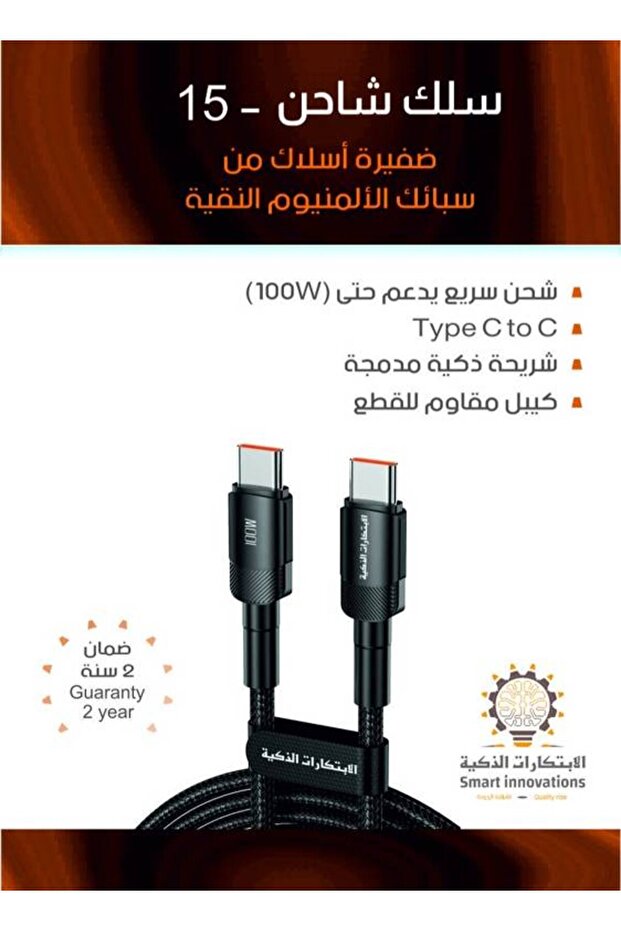


Smart Innovations iPhone 15 Charging Cable
No reviews yet.
-51%
39
SAR
79
(incl. VAT)
Color:null
Delivery address
Free shipping
Select your address, find out the delivery date!
Local delivery
Trendyol's commitments
Easy and free return in 15 days.
Payment methods




Highlighted features:
Smart Innovations iPhone 15 Charging Cable features
Color
Silver-colored
Warranty Period
Not specified
Connection Type
Lightning (8 Pin)
Instructions for Use/Warnings
Connect the first end of the cable to the charging port on your iPhone 15. Connect the other end of the cable to a power source such as a charger or USB-C port. Once the charger is connected, the device will start charging automatically. Make sure the charging icon appears on your device screen to ensure the process is done correctly. You can use your device while charging without affecting charging speed or performance. After charging is complete, disconnect the cable from the device and power source safely.
Similar items





 20,000mAh Mini Power Bank | 22.5W Fast Charge | Dual Ports + Built-in Type-C & Lightning Cables Gray







Shoppers also viewed




![Apple iPhone Charger Cable 1M [MFi Certified] USB C to Lightning Cable Fast Charging Power Delivery](https://cdn.dsmcdn.com/mnresize/420/620/ty1694/prod/QC_PREP/20250614/19/17ce0283-3d6f-39ef-a4bd-c0c8612dd85d/1_org_zoom.jpg)




Smart Innovations iPhone 15 Charging Cable reviews
No reviews yet.
Product details
Product description
The charger allows you to charge your device at high speed, even with devices that require a lot of power.
High endurance, you will be able to charge your devices as quickly as possible without affecting performance efficiency.
The charger is made of durable aluminum material, which ensures high resistance to corrosion and wear and tear.
It is characterized by robustness and flexibility in daily use, and is ideal for long-term use.
Thanks to its strong metal structure, the charger can withstand twists and intensive use without being affected.
The charger features an attractive design that adds a touch of elegance to your device.
You can use it with all other devices comfortably and beautifully.
It allows you to charge very quickly, saving you valuable time when you need to charge your device quickly.
Ideal for users who are constantly on the move and need fast charging on the go.
The charger features anti-tangle technology, making it easy to store and use effortlessly.
It ensures a comfortable user experience without having to worry about clutter or breakage due to tangling.
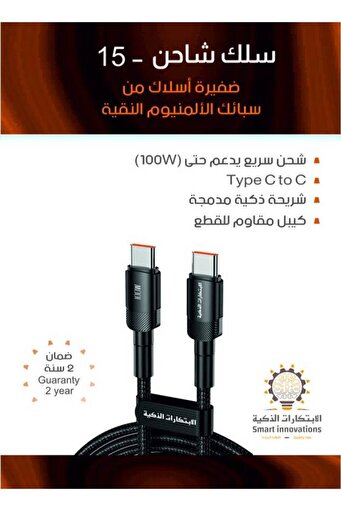
Specifications of iPhone 15 charging cable:Supports up to 100W: Fast and powerful charging for your devices.
Made of the finest types of aluminum: Durable design resistant to corrosion and wear.
High durability against ripple and torsion: Withstands daily use without being affected.
Modern and elegant design: Attractive shape that adds a touch of elegance.
Super-fast charging speed: Fast charging saves you valuable time.
Tangle-resistant: Easy to store and use effortlessly.
Category: Smart Innovation Products .
How to use:Connect the first end of the cable to the charging port on your iPhone 15.Connect the other end of the cable to a power source such as a charger or USB-C port.
Once the charger is connected, the device will start charging automatically.
Make sure the charging icon appears on your device screen to ensure the process is done correctly.
You can use your device while charging without affecting charging speed or performance.
After charging is complete, disconnect the cable from the device and power source safely.
Order now from the Smart Innovations Store "iPhone 15 Charging Cable" where it offers a variety of innovative products that meet all your needs, making it an ideal destination for innovation and modern technology enthusiasts.
Additional info
- Sold by .
- A maximum of 5 units of this product can be ordered. Trendyol reserves the right to cancel orders over 5 units.
- Barcode No: PMPRIMND130FEDV696
Smart Innovations iPhone 15 Charging Cable features
Color
Silver-colored
Warranty Period
Not specified
Connection Type
Lightning (8 Pin)
Instructions for Use/Warnings
Connect the first end of the cable to the charging port on your iPhone 15. Connect the other end of the cable to a power source such as a charger or USB-C port. Once the charger is connected, the device will start charging automatically. Make sure the charging icon appears on your device screen to ensure the process is done correctly. You can use your device while charging without affecting charging speed or performance. After charging is complete, disconnect the cable from the device and power source safely.
Safety information
Product safety information