


Free shipping
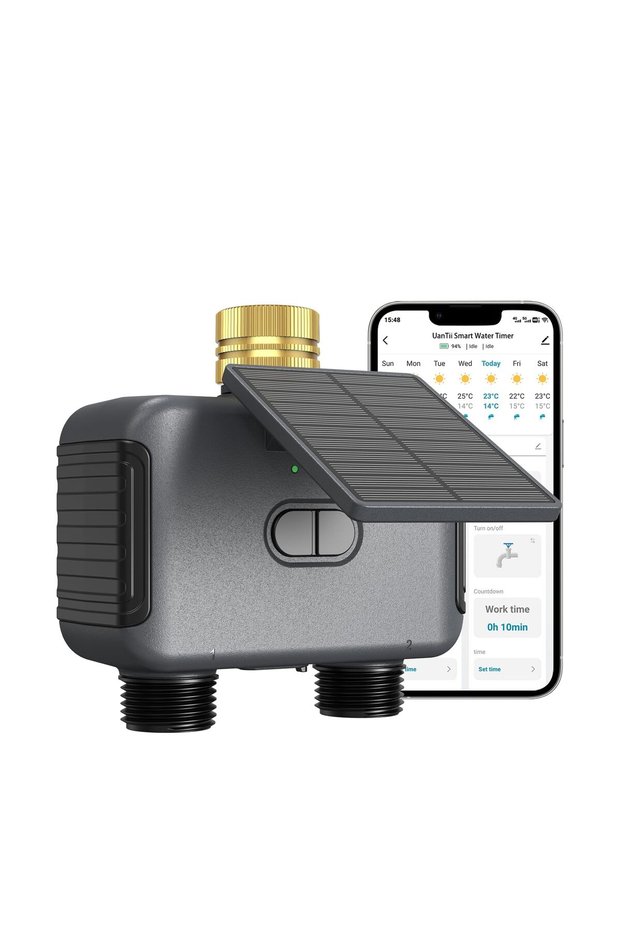
UanTii WiFi Smart Water Timer Hose Irrigation Valve Controller with Solar Panel & 2000mAh Rechargeab
No reviews yet.
-16%
332.56
SAR
395.90
(incl. VAT)
Free shipping
Delivery address

Select your address, find out the delivery date!
International delivery
Trendyol's commitments
Easy and free return in 15 days.
Payment methods



Highlighted features:
hubeirenqimaoyiyouxiangongsi
6.5
Seller information
UanTii WiFi Smart Water Timer Hose Irrigation Valve Controller with Solar Panel & 2000mAh Rechargeab reviews
No reviews yet.
Product details
Product description
, WiFi Range,50ft without interference Working Water Pressure,0.05-0.8MPa (7.25-116 psi) Working Temperature,4.5°C-45°C (40.1°F-113°F) Battery,2000mAh rechargeable Rain Delay Time,24/48/72 hours Protocol,Only 2.4GHz Wi-Fi Solar Panel,5V/0.6W Charging Method,USB-C charging and solar panel charging # How to Connect the Tuya WiFi Water Valve to the App Use the **Smart Life** app (Tuya Smart also works).
This device only supports **2.4 GHz Wi-Fi**.
5 GHz will not work.
## Before you start Prepare: - Fully charged timer (USB-C
charge a new unit before first use) - 2.4 GHz Wi-Fi name and password - Phone with Bluetooth **on** - Phone connected to the **same 2.4 GHz** network - Timer within range of the 2.4 GHz signal If your router is dual-band, give 2.4 GHz and 5 GHz **different names**.
Before you start Prepare: Fully charged timer (USB-C
charge a new unit before first use) Phone with Bluetooth on Phone connected to the same 2.4 GHz network Timer within range of the 2.4 GHz signal If your router is dual-band, give 2.4 GHz and 5 GHz different names.
Quick installation 1. Screw the timer onto an outdoor hose faucet (hand-tighten).
2. Install **Smart Life** from the App Store or Google Play and log in (or create an account).
3. Keep the phone on 2.4 GHz Wi-Fi and turn **Bluetooth on**.
4. Put the timer into pairing mode: - Press and hold the main / reset button for about **5–6 seconds** until the LED **flashes quickly**.
5. In Smart Life, tap **+** (Add Device).
6. Let the app auto-discover the timer (Bluetooth scan is usually fastest).
If it does not appear, choose a category such as **Industry &
Agriculture** → water valve / irrigation timer, or **Others (Wi-Fi)**.
7. Select your **2.4 GHz** network and enter the password.
8. Wait until pairing reaches 100%.
Rename the device if you want.
After success, the timer appears on the Smart Life home screen.
You can open/close the valve, set schedules, and use remote control while it stays on Wi-Fi.
## If pairing fails -
Additional info
- Sold by .
- A maximum of 5 units of this product can be ordered. Trendyol reserves the right to cancel orders over 5 units.
- Barcode No: TR-C1IK8YCLGZ-01
Safety information
Product safety information

