Free shipping
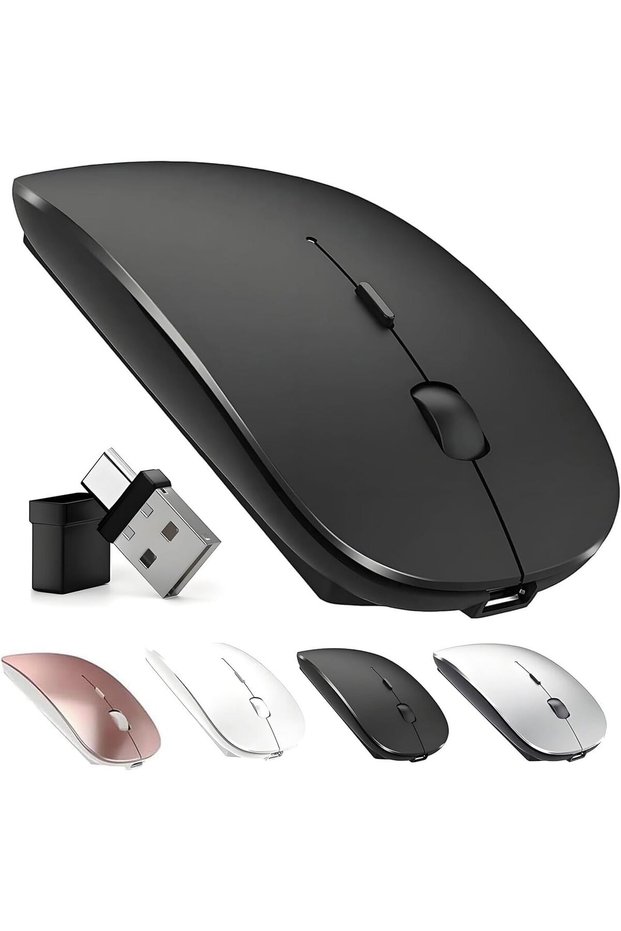


Zerun1650 Zeru Rechargeable Wireless Mouse for MacBook Pro/Air,Bluetooth Mouse for Laptop/PC/Mac/iPad pro/Computer
No reviews yet.
127.50
SAR
(incl. VAT)
Free shipping
Delivery address

Select your address, find out the delivery date!
Local delivery
Trendyol's commitments
Easy and free return in 15 days.
Payment methods




Highlighted features:
Zerun1650 Zeru Rechargeable Wireless Mouse for MacBook Pro/Air,Bluetooth Mouse for Laptop/PC/Mac/iPad pro/Computer features
Color
Black
Number of Buttons
10


Zerun1650 Zeru Rechargeable Wireless Mouse for MacBook Pro/Air,Bluetooth Mouse for Laptop/PC/Mac/iPad pro/Computer reviews
No reviews yet.
Product details
Additional info
- A maximum of 5 units of this product can be ordered. Trendyol reserves the right to cancel orders over 5 units.
- Sold by .
- Barcode No: tr-3AEQHJNFZK5
Zerun1650 Zeru Rechargeable Wireless Mouse for MacBook Pro/Air,Bluetooth Mouse for Laptop/PC/Mac/iPad pro/Computer features
Color
Black
Number of Buttons
10
Safety information
Product safety information
Product description
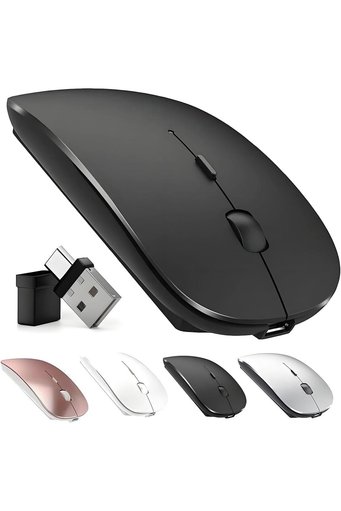
• [BEST COMPATIBLE BLUETOOTH 4.0 CHIP] - Compatible with more than 99% Bluetooth devices. Connect Pad 10.2 2019, Pad 9.7 Inch 2018, Pad 9.7 2017, Pad Pro 12.9" / 11.0" / 10.5"/ 9.7", Pad Air 10.5 / Air 2, Pad mini 5/ 4, Phone 11 Pro Max, Phone 11 Pro, Phone 11, Phone Xs Max etc.( Note: Updated System to PadOS 13 and iOS 13 or above, and Turn on the ¡°Assistive Touch¡± ) PC, Macbook pro air 2012/¡2017/2018/2019 laptop, notebook, Mac OS; Support Win7 Win8 Win10 Linux OS X or Android tablet. • 【Skin-Friendly for Comfort】Silent click Mouse with classic design with anti-fingerprint finish offers your hand maximum support and comfort. The sturdy anti-slip rubber scroll wheel ensures that your hand will not slip when scrolling. • 【Rechargeable Optical Wireless Mouse】Built-in durable 450mAh lithium rechargeable battery can last up to 500 hours after fully charged, and standby time is super long with auto sleep and wake mode. Easily recharged through the included USB cable, no need to change the battery. • 【NOISE FREE】Quiet click sound when pressing buttons, which makes you away from worrying about bothering others, especially at home while other family members having rest, so that you can stay focused on your work. • QUALITY GUARANTEE: One year quality for this bluetooth mouse from ZERU Manufacturer: ZERU Color: black • [BEST COMPATIBLE BLUETOOTH 4.0 CHIP] - Compatible with more than 99% Bluetooth devices. Connect Pad 10.2 2019, Pad 9.7 Inch 2018, Pad 9.7 2017, Pad Pro 12.9" / 11.0" / 10.5"/ 9.7", Pad Air 10.5 / Air 2, Pad mini 5/ 4, Phone 11 Pro Max, Phone 11 Pro, Phone 11, Phone Xs Max etc.( Note: Updated System to PadOS 13 and iOS 13 or above, and Turn on the ¡°Assistive Touch¡± ) PC, Macbook pro air 2012/¡2017/2018/2019 laptop, notebook, Mac OS; Support Win7 Win8 Win10 Linux OS X or Android tablet. • 【Skin-Friendly for Comfort】Silent click Mouse with classic design with anti-fingerprint finish offers your hand maximum support and comfort. The sturdy anti-slip rubber scroll wheel ensures that your hand will not slip when scrolling. • 【Rechargeable Optical Wireless Mouse】Built-in durable 450mAh lithium rechargeable battery can last up to 500 hours after fully charged, and standby time is super long with auto sleep and wake mode. Easily recharged through the included USB cable, no need to change the battery. • 【NOISE FREE】Quiet click sound when pressing buttons, which makes you away from worrying about bothering others, especially at home while other family members having rest, so that you can stay focused on your work. • QUALITY GUARANTEE: One year quality for this bluetooth mouse from ZERU Manufacturer: ZERU Color: black New upgraded chip Achieve a faster connection. The newly optimized chips make the connectivity more stable. Compatible with more than 99% Bluetooth devices Multi-Function Wireless Bluetooth mouse (BT5.2 + BT3.0 +2.4GHz USB-A + 2.4GHz USB Type-C) Four working modes ZERU Bluetooth wireless mouse can freely switch between two devices. For example, it can switch from a computer to a laptop , or from a tablet to a MacBook. This is a simple conversion. It is convenient and there is no need to wait. Just gently switch the switch, and you can seamlessly switch between two different sets of devices and enjoy an efficient office and entertainment experience. How to use mouse 2.4G USB receiver mode First, switch the mouse switch to 2.4G mode (green light)> Then remove the USB from the bottom of the mouse , > Plug the USB receiver into the USB port of your laptop,plug and play.(Works with all USB ports ) How to use the bluetooth mouse On the ipad OS13 and above iPad pro 11/12.9inch ipad air 10.9inch ipad mini 8.3inch iPad 10th gen 9th gen 10.9inch : First, open iPad settings, find accessibility, turn on touch controls, find assistive touch controls, turn on assistive touch controls, then pull down to find the device, turn on the Bluetooth device, then turn on the mouse switch, press and hold the black button on the bottom of the mouse for 3-4 seconds, your iPad will search for a Bluetooth 5.2 mouse and click "Connect". Pairing password: 0000, (if you can't find the Bluetooth mouse device, please restart the mouse or iPad Bluetooth function, or restart the iPad)