


Free shipping
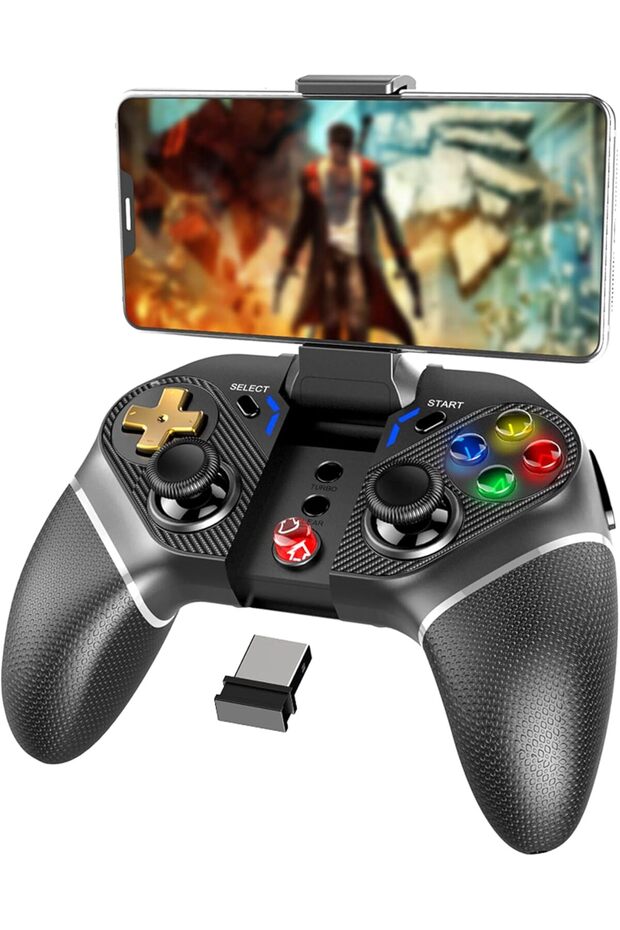


ipega Wireless Game Controller PG-9118 for Android Phones, Tablets, PC, and Android TV Box
No reviews yet.
Almost sold out!
Lowest price in 30 days
-25%
135
SAR
180
(incl. VAT)
Delivery address
Free shipping
Local delivery
Estimated delivery: 22 - 25 October
Select your address, find out the delivery date!
Trendyol's commitments
Easy and free return in 15 days.
Payment methods



Highlighted features:
ipega Wireless Game Controller PG-9118 for Android Phones, Tablets, PC, and Android TV Box features
Color
Black
Product Type
Gamepad
Connection
Wireless
Instructions for Use/Warnings
Ensure your system is Android 6.0 or higher before purchase. Not compatible with MediaTek chip phones or Apple iOS system devices. Customers must choose the startup method for pairing according to their devices. For Android V3 direct mode, press and hold A + HOMT button for two seconds, turn on mobile phone wireless Bluetooth, connect, and then open ShootingPlus V3 for button settings. For Standard Android game mode, press and hold X + HOMT button for two seconds. Download the ShootingPlus V3 app for installation and customize settings. Adjust the virtual joystick size appropriately to avoid too many blind spots and align buttons with the virtual joystick to avoid inability to operate. You can search for PG 9118 tutorial videos on YouTube. Please ensure your mobile device is suitable for game controllers before purchasing and check your device system. Before starting, match the device game mode.
Origin
CN
Bluetooth
Available
Similar items



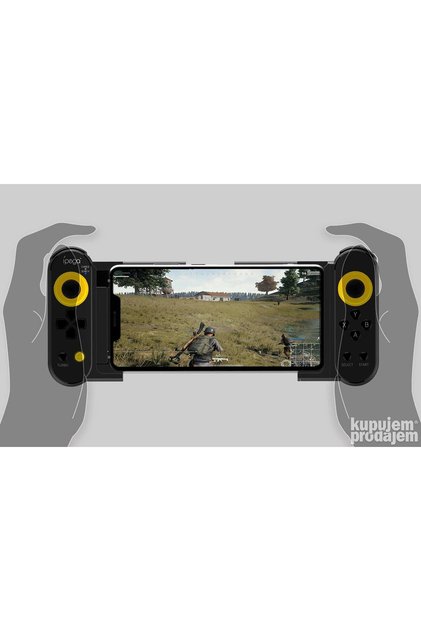






 An unparalleled wireless gaming controller: "Double-Motor Vibration 4 Wireless Controller"








Shoppers also viewed









ipega Wireless Game Controller PG-9118 for Android Phones, Tablets, PC, and Android TV Box reviews
No reviews yet.
Product details

Product description
Compatible with Android 6.0 and above, including mobile phone models like Samsung Galaxy S9/S9+, S10/S10+, Note 10, Galaxy S20, Galaxy Z, Huawei Mate 20/20+, P30, Oppo R17, Find X, Vivo X23/X27/X30/X30 Pro, Xiaomi 10/10 Pro, Windows 7/8/10 PCs, smartphones, and tablets (ensure your system is Android 6.0 or higher before purchase).
Not compatible with MediaTek chip phones.
Startup methods: Customers must choose the startup method for pairing according to their devices.
Android V3 direct mode: Press and hold A + HOMT button for two seconds to enter direct play mode, turn on mobile phone wireless Bluetooth, and click connect.
After successful connection, open ShootingPlus V3 for button settings.
Standard Android game mode: Press and hold X + HOMT button for two seconds to enter direct play mode.
Download the ShootingPlus V3 app: Customers need to download the ShootingPlus V3 app for installation and customize settings according to their habits.
Adjust the virtual joystick size appropriately to avoid too many blind spots.
When adjusting buttons, please align with the virtual joystick to avoid inability to operate.
Customers can search for a related PG 9118 tutorial video on YouTube.
The PG 9118 uses wireless 4.0 connection, no complex settings, no need to download an additional app, the device can operate immediately.
"
Peace Elite"
, "
Glory of the King"
, and "
Wilderness Action"
are compatible with popular mobile phones.
The structure is comfortable, operation is convenient, positioning is accurate, and it extends 75mm (3 inches).
Built-in high-performance 380mAh lithium battery, which can be used continuously for more than 15 hours and is fully charged for up to 30 days.
Please ensure your mobile device is suitable for game controllers before purchasing.
The 9118 is not compatible with Apple iOS system devices.
The Ipega PG 9118 is compatible with Android 6.0 and newer mobile devices and tablets.
Please check your device system.
Before starting, please match the device game mode.
Specifications: Operating voltage: DC 3.7V, Operating current: 25mA, Continuous playing time: 20 hours, Static current: <
10uA, Charging: DC 5V/500mA, Transmission distance: <
8 meters, Battery capacity: 400mAh, Standby time: up to 30 days once fully charged.
Android HID standard Bluetooth direct play mode, plug and play.
Package includes: 1 x Wireless Controller, 1 x USB Cable, 1 x User Manual.
Additional info
- Sold by .
- A maximum of 5 units of this product can be ordered. Trendyol reserves the right to cancel orders over 5 units.
- Barcode No: 611864736433
- Origin: CN
ipega Wireless Game Controller PG-9118 for Android Phones, Tablets, PC, and Android TV Box features
Color
Black
Product Type
Gamepad
Connection
Wireless
Instructions for Use/Warnings
Ensure your system is Android 6.0 or higher before purchase. Not compatible with MediaTek chip phones or Apple iOS system devices. Customers must choose the startup method for pairing according to their devices. For Android V3 direct mode, press and hold A + HOMT button for two seconds, turn on mobile phone wireless Bluetooth, connect, and then open ShootingPlus V3 for button settings. For Standard Android game mode, press and hold X + HOMT button for two seconds. Download the ShootingPlus V3 app for installation and customize settings. Adjust the virtual joystick size appropriately to avoid too many blind spots and align buttons with the virtual joystick to avoid inability to operate. You can search for PG 9118 tutorial videos on YouTube. Please ensure your mobile device is suitable for game controllers before purchasing and check your device system. Before starting, match the device game mode.
Origin
CN
Bluetooth
Available
Safety information
Product safety information